Frequently Asked Questions
Find answers to common questions about MGost
MGost provides several advantages over Microsoft Word, them main of which are:
- Full automatic creation of styles according to ГОСТ (margins, font size, tabs, formulas)
- Automatic numbering of headers, images, formulas, tables, and appendix
- The ability to integrate with version control systems such as git
You can create and edit projects using the site or CLI Python library. Below are the instructions for using site editor.
- Create or log in to your account
- Create a project
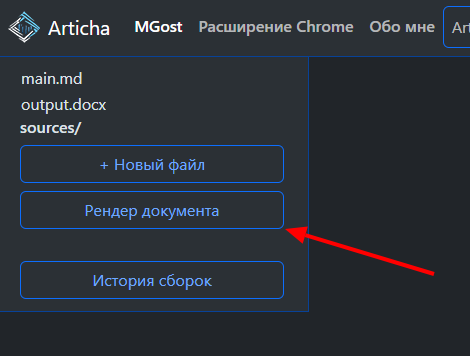
- Perform a project render
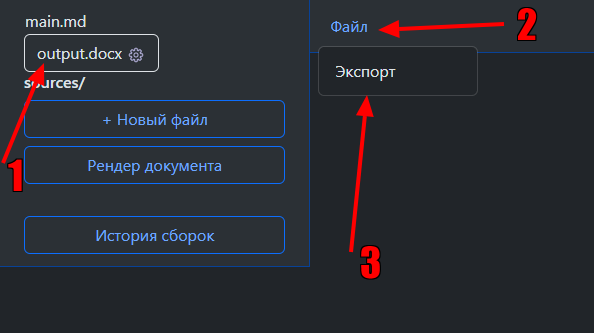
- Download the rendered Word document
There is 2 types of limitations:
- User trust — you can read more about this here
- Technical limitations:
- • Splitting up tables
- • The absence of heading "продолжение листинга #" in the appendix
There is MGost documentation and 4 examples of input and output md/docx files:
| Название | Markdown | Документ Word |
|---|---|---|
| init | init.md | init.docx |
| diploma_short | diploma_short.md | diploma_short.docx |
| diploma | diploma.md | diploma.docx |
| diploma_headers | diploma_headers.md | diploma_headers.docx |